
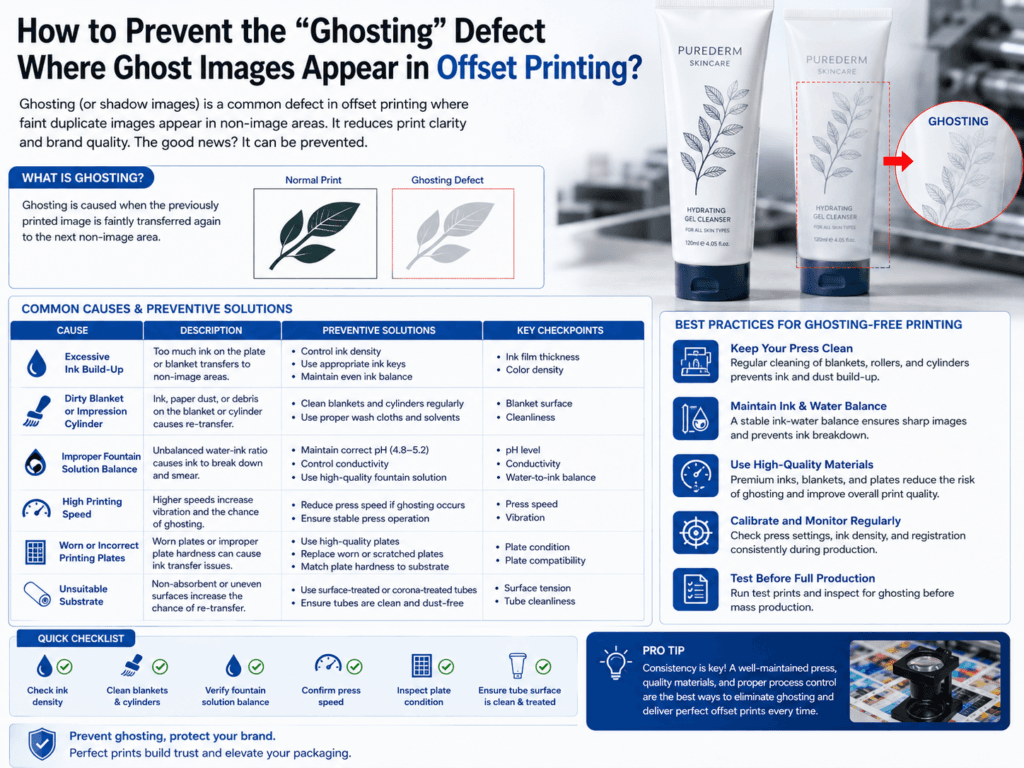
To prevent the “ghosting” defect in offset printing, factories usually focus on stabilizing ink supply, roller settings, and ink-water balance. Ghosting typically appears as a faint repeated image or uneven tonal echo near heavy solid areas. In practical production, it is most often caused by ink starvation, poor roller recovery, incorrect roller settings, uneven ink distribution, or unstable dampening control.
In simple terms, ghosting happens when one part of the image draws so much ink or disturbs the press condition so strongly that another nearby area cannot print evenly. On decorative packaging work, this problem is especially visible around large dark solids, logos, dense backgrounds, or repeated design elements.
What Causes Ghosting in Offset Printing?
| Cause | What Happens | Typical Result |
|---|---|---|
| Ink starvation | Heavy image areas consume more ink than the rollers can recover quickly | Faint repeated image or tonal weakness nearby |
| Incorrect roller settings | Ink form rollers do not transfer ink evenly | Ghost images or unstable density |
| Ink-water imbalance | Dampening interferes with normal ink transfer | Chemical ghosting or inconsistent print tone |
| Poor ink distribution | Ink train cannot maintain a uniform film across the image | Visible density change around solids |
| Unsuitable paper or substrate behavior | Surface absorbency or print response varies under heavy coverage | More obvious tonal shifts and repeat marks |
Main Types of Ghosting
- Mechanical ghosting: Usually caused by uneven ink transfer, ink starvation, or poor roller recovery.
- Chemical ghosting: Usually linked to improper ink-water balance, drying interaction, or press chemistry.
- Gloss ghosting: The image may not look darker in color, but the gloss level changes and creates a ghost effect under light.
How Factories Prevent Ghosting
| Preventive Action | Why It Helps |
|---|---|
| Adjust roller settings correctly | Improves even ink transfer and faster recovery after heavy image areas |
| Balance ink and dampening solution | Reduces chemical instability and uneven printing conditions |
| Improve ink distribution | Helps the press maintain more uniform density across solids and nearby areas |
| Use suitable ink for the job | Correct tack and flow characteristics reduce starvation and instability |
| Modify artwork coverage if needed | Can reduce extreme local ink demand in one zone of the sheet |
Artwork-Related Ways to Reduce Ghosting
- Avoid excessive solid coverage concentrated in one area if possible.
- Distribute heavy image masses more evenly across the design.
- Be careful with large dark blocks next to delicate tonal areas, because this contrast often reveals ghosting faster.
- Use sample proofs early when the design includes strong solids, repeated patterns, or critical brand tones.
Most Common Symptoms of Ghosting
| Symptom | What It Usually Suggests |
|---|---|
| Faint duplicate image near a solid | Mechanical ghosting from ink starvation or roller recovery problems |
| Uneven density after a heavy image area | Ink distribution is unstable |
| Phantom image visible under certain light | Gloss ghosting or drying imbalance |
| Ghosting appears only on some colors | Ink formulation or press setting differs by color unit |
Best Pressroom Practices
- Check roller pressure and alignment regularly
- Keep the ink train stable across long runs
- Control fountain solution consistently
- Use the right ink-paper or ink-substrate combination
- Run trial sheets before full production when the artwork includes large solids or critical tonal areas
Summary
To prevent ghosting in offset printing, factories usually improve roller settings, ink distribution, and ink-water balance. The defect is most often caused by mechanical ink starvation or chemical instability around heavy image areas. Good press control, suitable ink choice, and thoughtful artwork planning are the most effective ways to reduce ghost images before they become visible in production.
Learn more: Offset Printing Tubes, Printing Options, Tube Decoration, Silk Screen Printing vs. Offset Printing, Printing Design, Quality Assurance.
Need More Stable Offset Printing for Cosmetic Tubes?
Xinfly Packaging helps brands optimize artwork coverage, printing process control, and decoration quality to reduce offset defects such as ghosting, tonal inconsistency, and density variation.