
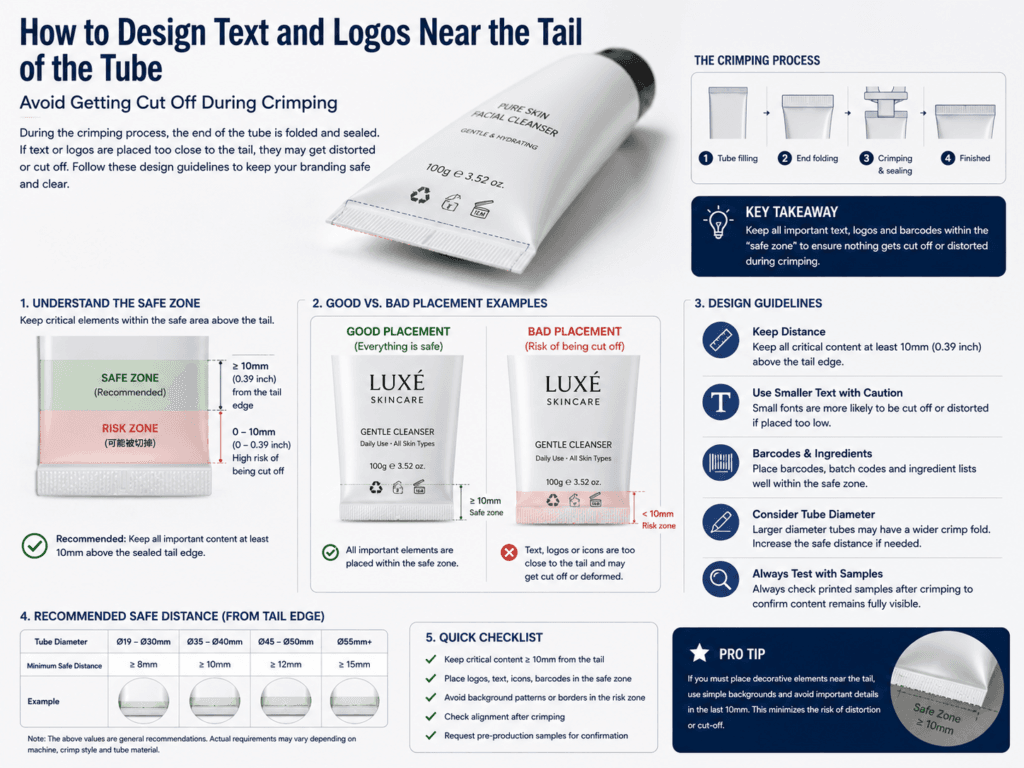
To avoid text and logos getting cut off during tube crimping, factories usually require all critical artwork to stay out of the sealing and tail-safe area. The key rule is simple: the tail of the tube is not a normal decoration zone. During sealing and crimping, that area is compressed, folded, and slightly shifted, so any logo, product name, or fine text placed too close to the tail can be partially cut, distorted, or hidden.
For custom cosmetic tubes, the safest approach is to design from the factory dieline instead of guessing the printable area. A correct tube template should clearly mark the printable area, safe zone, and sealing zone. In general packaging practice, critical text and logos should always stay inside the designated safe area rather than near cut, fold, or seal lines.
Why the Tail Area Is High Risk
| Tail Condition | What Happens During Production | Risk to Artwork |
|---|---|---|
| Crimping / sealing | The tail is pressed and sealed shut | Text or logos can be cut or deformed |
| Tube flattening | The tail area changes shape compared with the round body | Artwork may look compressed or uneven |
| Machine tolerance | Small production variation exists in sealing position | Artwork placed too close may shift into the seal area |
| Repeated handling | The tail gets more mechanical stress than the main body | Delicate details near the tail are less stable visually |
Best Rule for Text and Logos Near the Tail
- Keep all critical text inside the supplier’s safe area and away from the sealing zone.
- Never place the main logo across the crimp line or too close to the tail edge.
- Use the official dieline from the tube manufacturer rather than a generic flat layout.
- Leave extra visual margin near the tail even if the template already shows a nominal safe zone.
What Counts as “Critical Artwork”?
| Artwork Type | Should It Stay Away from the Tail? | Reason |
|---|---|---|
| Brand logo | Yes | Most important element should not risk distortion |
| Product name | Yes | Must remain fully readable after sealing |
| Small descriptive text | Yes | Small text is the first to become unreadable |
| Decorative background color block | Sometimes acceptable | Non-critical graphics can extend closer if approved by the factory |
How Much Distance Should Be Left?
The exact safe distance depends on the tube size, tail length, sealing method, and factory tooling, so there is no universal one-number rule for every project. The most reliable method is to follow the manufacturer’s dieline and keep all essential content inside the marked safe zone. General print-production guidance also emphasizes that important graphics should stay inside the safe area and away from fold, trim, or seal lines to avoid cut-off risk.
Best Design Practices Near the Tube Tail
- Move key text upward instead of aligning it close to the bottom edge of the printable body.
- Use larger spacing around logos so small seal-position variation does not affect the design.
- Avoid fine reverse text near the tail because deformation makes it harder to read.
- Keep decorative lines and borders away from the crimp zone unless they are intentionally designed to stop before sealing.
- Check the design on a filled and sealed sample, not only on an empty tube proof.
Common Mistakes That Cause Artwork to Be Cut Off
| Mistake | Typical Result |
|---|---|
| Using a generic artwork layout | Logo or text sits too low for the real sealing position |
| Placing product name near the tail edge | Text is partially sealed over or visually compressed |
| Ignoring tail-safe zone | Artwork looks misaligned after crimping |
| Approving only flat artwork | Real sealed tube reveals hidden cut-off risk |
Best Workflow Before Mass Production
- Request the exact tube dieline from the supplier
- Mark the sealing zone and safe zone clearly in the artwork file
- Keep all critical text and logos above the tail-safe boundary
- Review an actual sealed sample before final approval
- Adjust the layout if any part of the design appears visually too close to the crimping area
Summary
To avoid text and logos getting cut off during tube crimping, brands should treat the tail area as a restricted sealing zone, not a normal decoration area. The safest method is to use the factory dieline, keep all critical artwork inside the marked safe zone, and leave extra visual margin above the crimp area.
For cosmetic tubes, the most reliable design approval is always based on a real sealed sample, because the final crimped tail can change the appearance of low-positioned artwork more than a flat proof suggests.
Learn more: Design Area Dimensions, Customize Cosmetic Tubes, Printing Design, Tube Decoration, Quality Assurance, Cosmetic Tube Packaging Guide.
Need Safer Artwork Layout for Custom Cosmetic Tubes?
Xinfly Packaging helps brands prepare tube artwork using the correct dieline, safe zone, and sealing-zone layout so logos, text, and key design elements stay clean after crimping and mass production.