
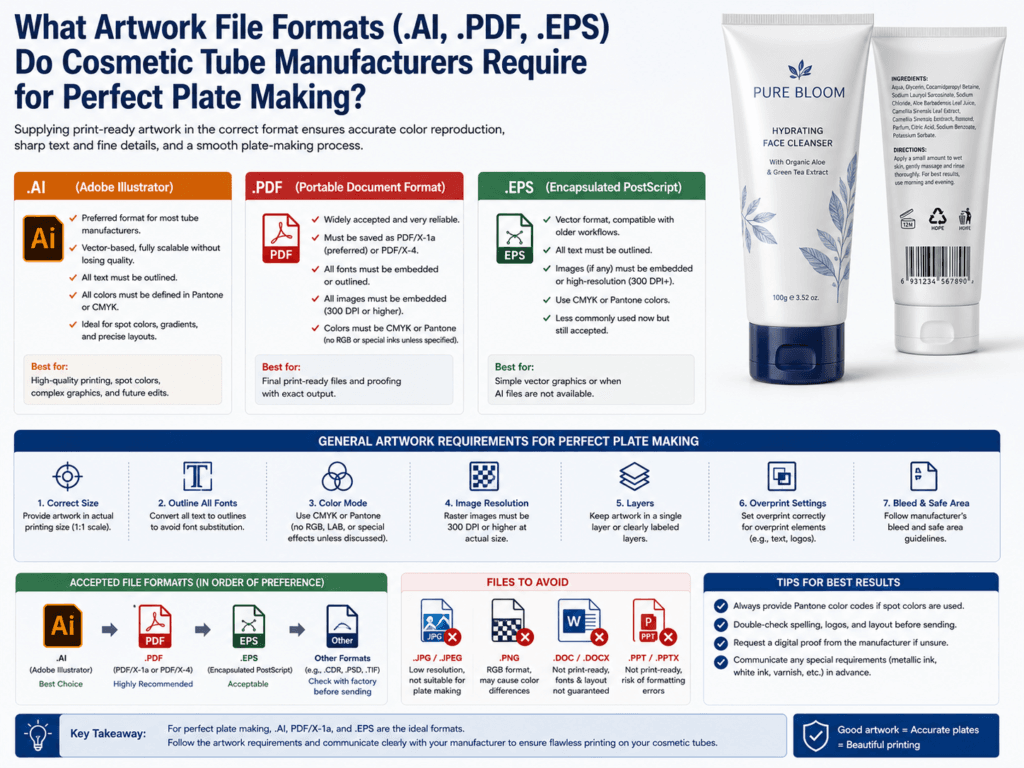
For perfect plate making, cosmetic tube manufacturers usually prefer vector artwork files such as .AI, press-ready .PDF, or .EPS. These formats are widely used in packaging prepress because they preserve clean vector paths, editable spot colors, and accurate line quality much better than common image formats such as JPG or PNG.
In practical production, the question is not only “Which format is accepted?” but also “Which format is truly plate-ready?” A file may technically open, but still create prepress problems if fonts are not outlined, images are low resolution, colors are in RGB instead of CMYK or Pantone, or linked graphics are missing. For premium cosmetic tube printing, manufacturers usually want a vector master file plus a print-ready PDF for checking and output.
Which File Formats Are Usually Accepted?
| File Format | Typical Use | Plate-Making Suitability |
|---|---|---|
| .AI | Native Adobe Illustrator artwork | Excellent for editable vector production files |
| Press-ready review and prepress output | Excellent when exported correctly | |
| .EPS | Legacy vector exchange format | Still usable for vector artwork in some workflows |
Which Format Is Best?
- .AI is usually best as the editable source file because it keeps the artwork structure clean for revisions.
- .PDF is usually best as the final checking and print-ready delivery file because it is widely used in packaging prepress.
- .EPS can still work, but many modern workflows now prefer AI and PDF for smoother packaging prepress handling.
What Manufacturers Usually Require Beyond File Format
| Requirement | Why It Matters |
|---|---|
| Fonts outlined | Prevents text substitution or reflow if the printer does not have the font installed |
| Images at high resolution | Avoids blurry or pixelated print results |
| Colors prepared correctly | CMYK and Pantone setup affects final print accuracy |
| Linked graphics included or embedded correctly | Prevents missing-image errors in prepress |
| Dieline/template respected | Keeps artwork in the correct printable and safe zones on the tube |
Why Vector Files Are Preferred for Plate Making
- Sharper lines: Vector graphics stay clean at any production size.
- Better text control: Small logos and typography hold better in prepress.
- Cleaner spot-color handling: Pantone and separation work is easier to manage.
- More reliable plate output: Fine curves, outlines, and shapes reproduce more accurately.
Common File Problems That Delay Plate Making
| Problem | Typical Result |
|---|---|
| Fonts not outlined | Text changes unexpectedly during output |
| RGB artwork | Color shift when converted for print production |
| Low-resolution raster images | Soft or pixelated printed details |
| Missing linked files | Blank or incorrect artwork areas in prepress |
| No dieline alignment | Artwork may print outside the safe or printable zone |
Best Delivery Practice for Cosmetic Tube Artwork
| What to Send | Why It Helps |
|---|---|
| Editable .AI file | Lets the factory or prepress team adjust and verify production details |
| Press-ready .PDF | Provides a stable reference for approval and output checking |
| Outlined text | Protects the design from font problems |
| CMYK / Pantone color setup | Improves color control in production |
| High-resolution placed images | Supports better plate output and print clarity |
What About PSD, JPG, PNG, or Canva Files?
These file types may be useful for reference, but they are usually not ideal as the main plate-making files for cosmetic tubes. Raster formats do not offer the same vector precision, spot-color control, or prepress stability as AI, PDF, or EPS. If a brand starts with raster artwork, the factory may need to redraw or rebuild the file before production.
Best Practical Advice for Beauty Brands
If you want smoother plate making and fewer delays, the safest approach is to prepare the artwork in Adobe Illustrator, outline all fonts, place high-resolution images correctly, and deliver both the native AI file and a press-ready PDF. This gives the factory one editable production file and one stable checking file, which is often the most efficient combination for custom cosmetic tube printing.
Summary
Cosmetic tube manufacturers usually require .AI, .PDF, or .EPS files for high-quality plate making, with .AI and press-ready .PDF being the most practical modern combination. The most important issue is not only the extension, but whether the file is truly production-ready: vector-based, fonts outlined, colors prepared correctly, images high resolution, and artwork aligned to the correct tube dieline.
For premium cosmetic tube printing, a clean vector file plus a print-ready PDF usually gives the smoothest prepress and the best chance of perfect plate output.
Learn more: Design Area Dimensions, Printing Design, Printing Options, Customize Cosmetic Tubes, Tube Decoration, Quality Assurance.
Need Help Preparing Print-Ready Artwork for Cosmetic Tubes?
Xinfly Packaging helps brands check file format, dieline alignment, fonts, colors, and image quality before plate making so custom tube production moves faster and more accurately.