
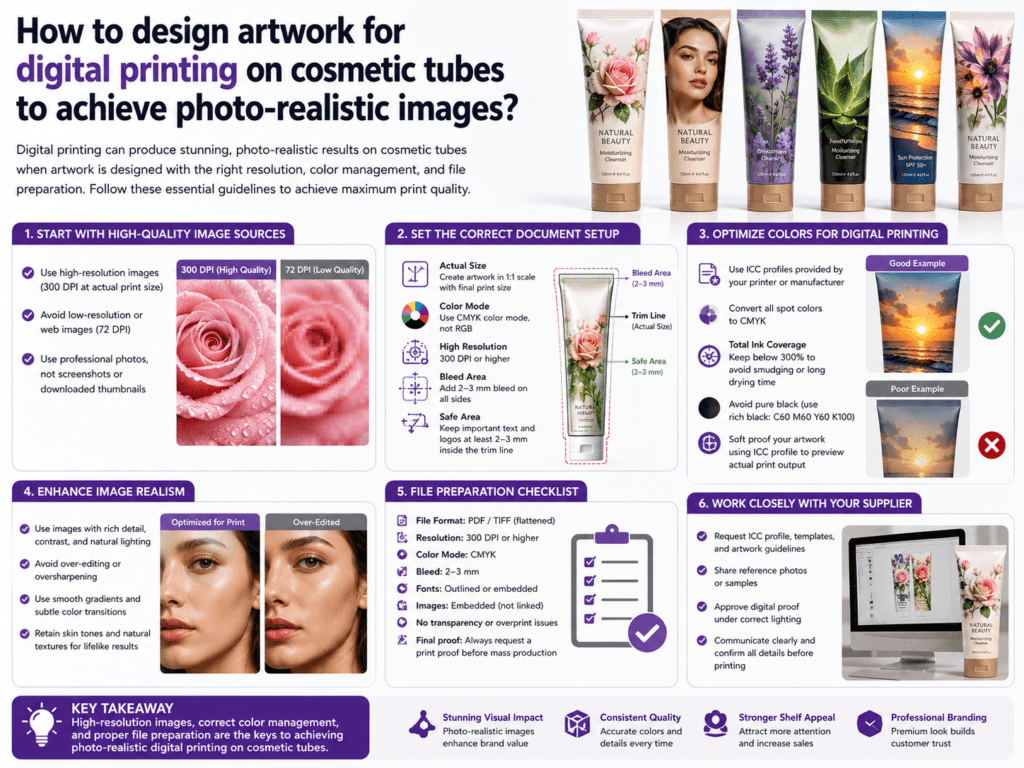
To achieve photo-realistic images with digital printing on cosmetic tubes, the artwork must be designed specifically for curved packaging, high-resolution output, and the real print behavior of the tube surface. A beautiful image on a flat computer screen can lose detail, shift color, or look distorted once it is wrapped around a tube if the file is not prepared correctly.
For cosmetic tubes, photo-realistic digital printing depends on more than image resolution alone. The final result is controlled by artboard size, color mode, highlight and shadow balance, tube curvature, material color, white ink handling, and print-safe layout. In simple terms, the artwork must be built for packaging, not just for general graphic design.
What Makes Photo-Realistic Tube Printing Different?
| Design Factor | Why It Matters | Effect on Final Print |
|---|---|---|
| Tube curvature | The artwork wraps around a round or oval surface | Images can look stretched or misaligned if layout is not adapted |
| Digital print resolution | Fine details need enough pixel density | Low resolution makes the image look soft or grainy |
| Material and surface finish | Glossy, matte, or textured tubes reflect light differently | Can change image sharpness and color depth |
| White base layer | Important on clear, metallic, or colored substrates | Affects brightness and realism of printed photos |
Best Artwork Rules for Photo-Realistic Images
- Use high-resolution source images: Start with clean, sharp images that hold detail when enlarged.
- Design in actual print scale: Build the file at the real tube print size instead of relying on rough scaling later.
- Keep important details away from the seam and curve edges: Faces, product highlights, and key text should stay in the most visible front panel area.
- Control shadows and highlights carefully: Very dark shadows can plug up, and very light highlights can disappear on curved packaging.
- Use print-friendly color contrast: Mid-tones usually reproduce more reliably than extreme light or dark transitions.
Recommended File Setup
| Artwork Element | Recommended Approach |
|---|---|
| Color mode | Prepare in CMYK or according to the printer’s required production workflow |
| Image format | Use high-quality layered design files and embedded high-resolution images |
| Bleed / safe zone | Leave enough safe space for trimming, shoulder curve, and seam tolerance |
| Text handling | Keep small text separate from complex photo areas when possible |
| White ink layer | Plan white underprint areas if the substrate is not pure white |
How to Make the Image Look More Realistic on a Tube
- Use strong focal composition: Put the main subject in the center viewing area of the tube.
- Reduce overly fine background noise: Complex photo textures can look busy or muddy once printed small.
- Enhance local contrast carefully: This helps the image stay vivid on packaging without looking over-processed.
- Test skin tones, botanical images, and metallic visual effects: These are often the first areas where realism breaks down.
- Match finish to artwork style: Glossy tubes often enhance photo depth, while matte finishes create a softer premium look.
Common Design Mistakes That Reduce Photo Realism
| Mistake | Typical Result |
|---|---|
| Using low-quality source images | Blurry or pixelated print output |
| Ignoring tube curvature | Main image looks distorted when wrapped |
| Overloading the design with text | Photo loses visual impact and looks cluttered |
| No white underprint planning | Image looks dull on colored or transparent tube surfaces |
| Skipping press proof or sample check | Unexpected color shift or loss of detail in production |
Best Workflow Before Mass Production
- Confirm the exact tube diameter, print area, and seam position first
- Ask the supplier for a design template in real size
- Prepare artwork with print-safe image placement
- Review a digital mockup and a physical printed sample
- Adjust contrast, brightness, and white ink support after sample review
When Digital Printing Is the Best Choice
Digital printing is especially useful for photo-realistic cosmetic tube artwork when a brand needs short runs, multiple SKU versions, vivid full-color imagery, fast sampling, or versioned designs. It is often the most flexible choice for premium visual storytelling, especially when compared with traditional spot-color methods that are better for simpler artwork.
Summary
To design artwork for digital printing on cosmetic tubes and achieve photo-realistic images, brands should use high-resolution images, design in real print scale, respect the tube curvature, manage highlights and shadows carefully, and plan the file specifically for the actual tube surface and print process.
The best results come from combining strong packaging-specific artwork design + correct white ink planning + physical sample approval before mass production.
Learn more: Printing Options, Printing Design, Tube Decoration, Design Area Dimensions, Offset Printing Tubes, Customize Cosmetic Tubes.
Need Help Designing Photo-Realistic Tube Artwork?
Xinfly Packaging helps beauty brands optimize cosmetic tube artwork for digital printing, realistic image reproduction, premium shelf appearance, and reliable production results.